
Client records
The data about your clients is the alpha and omega of the system. First we create several different databases of your clients. The main database contains data about all clients. We then assign various "statuses" to clients, for example:
- active client (has bought a stay or trip but has not taken it yet),
- potential client (has shown interest in buying, for example by registering, calling or e-mailing),
- past client (bought at least one trip from you in the past),
- VIP client (a specific client who travels through you regularly and/or has bought a luxury stay at a high price).
You can also add fellow travellers to clients (for example family members, with their own profile), preferences (meals, seat on the plane, room standard, destination and so on) and any other data. This data helps you not only in communication during the purchase, but also in targeting your marketing.
Every client is assigned to one of your employees (a consultant), so you know exactly who is responsible for the client and who should be the first to talk to them about the products they bought. For every client you also see invoices, payments, history and e-mail communication.
Automatic invoices and recording of payments
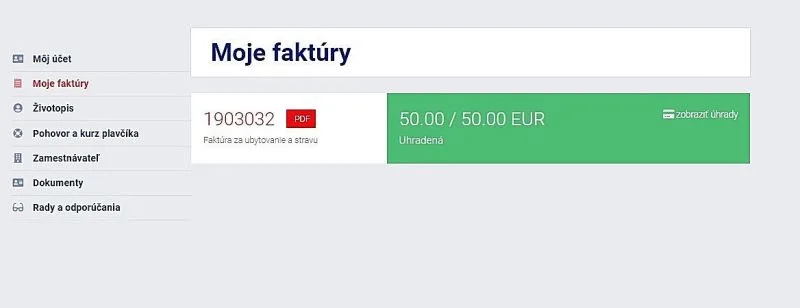
Your system will automatically record payments received on your bank account and match them to specific clients and invoices by the variable symbol, which is unique for every client.
From time to time it is enough to check unpaid invoices and see whether they were paid with a wrong variable symbol, so that you can add the payment manually. According to our clients' statistics, the correct variable symbol is entered in more than 98% of payments (for recurring payments in more than 99.9% of cases).
If you want to give clients who have already bought from you a discount on their next product, you simply set the discount for returning clients (and choose the product the discount applies to and which clients are entitled to it). The system automatically recognises what the client bought and when, and if they qualify, the discount is applied automatically. It is up to you how you set up the discount (and its tiers): the system will not forget and will inform the client about it.
Generating contracts for clients
Until now you (probably) had to fill in a contract for every new client, or clients sent it to you filled in. From now on the system does it for you. Either you enter the client's data into the system (manually), or you send the client an e-mail inviting them to register (the client enters all the data), or they register on your website themselves. You then generate the contract as a PDF, which you can print, send by e-mail or post to the client (we can also connect your system to an external postal service provider: at the press of a button the provider receives the PDF contracts and the recipient's details and posts the item for you).
Connection to external systems (Amadeus, RentalCars and others)
Yes, we can do this too. If you need to connect your system to external systems (you sell flight tickets, want to offer Rental Cars car hire directly on your website, want to connect to an insurer's sales system, or want the prices of trips on your website always updated to your supplier's prices), we can connect your system to them via an API, provided your supplier offers such a connection.
We go through the API connection with you and summarise the advantages, disadvantages and expected costs. Based on that you decide whether the connection pays off for you (you know best how much work it saves and how much it reduces errors compared with entering data by hand). Every API connection is individual and we are happy to look at it, assess it and price it. Our cheapest connections start at 500 euros.
Custom stay and gift vouchers
You know how it is: a satisfied client is happy to come back, and the lowest price need not be their main criterion. That is why offering gift vouchers as a small token, a reminder that you still think of the client, may be interesting for you too. If you want to offer a special birthday discount or recommend a great deal they won't easily find elsewhere, our gift voucher solution makes the work easier. You set which gift, recommendation, trip or discount the voucher should carry, and the system sends gift vouchers on your clients' birthdays for you.
If you are wondering what the voucher should look like or what the accompanying text of the "gift" e-mail should say, we can take care of all that: we work with talented graphic designers and copywriters. And in case we haven't mentioned it yet, your system also adds the client's salutation to automatic e-mails (a trifle, but we would rather write it down).
If you want to offer clients special stay packages as well, again no problem. You only need to think through the sending logic (who receives the voucher with the package and when; you can also send it "manually" to anyone with one click). The system can send the packages automatically, for example 20 days after the client returns from their last trip if they have no trip booked for the next 12 months. It is that simple, and that effective.
A perfect overview of communication with the client
All e-mails you send to a client through the system are automatically saved in the history of e-mail communication with that client. Incoming e-mails can also be set up to be saved directly under the client's account, so you have the whole course of e-mail communication under control.
If you are a larger company and want full control over phone communication too, we can connect your system to a VoIP telephone exchange. Your telecommunications bills go down (you call over the internet and need only an internet connection). In addition, every call from a client is automatically recorded in your system (the length of the call, its content as a recording and so on).
Notepad
Since you sometimes need to write down specific requests for a client, we let you record them directly in the system, and paper notes become a thing of the past. The client detail includes a notepad where you can write and delete any notes you need. A timestamp and the name of the employee who wrote the note are attached automatically (if, for example, the employee responsible for the client changes, you simply reassign the client to the new consultant and write it in the client's notes).

Affiliate partner
We can also add unique affiliate links to your system. If you have partners (a travel blogger, an influencer, a partner company) to whom you want to offer special rewards for new clients, or if the purchased products are reimbursed by the client's employer (flight tickets, insurance, car hire), you can create a unique affiliate link for them.
The affiliate link system is fully transparent: already at registration or sale you know who brought you the new client. Your affiliate partner can also check at any time how many clients they have brought and what reward they are due.
If a new client registers or buys a product through this affiliate link, they are automatically assigned to the affiliate partner, and it is easier for you to pay rewards or invoice products to corporate and regular clients.
For affiliate links you can set how long they are kept in the browser's memory (we use cookies for this). So if a new client opens your website and registers or makes a purchase within, say, 5 days of last opening it (even without using the affiliate link again), they are still assigned to the affiliate partner whose link they last opened.
Affiliate links can of course also be set up so that nothing is stored in the end user's cookies. For you this means that a new client is assigned to an affiliate partner only if they open the unique affiliate link (if they return to your website without it, the browser no longer remembers it and the client is not assigned to the partner).

Timer
Perhaps it often happens that a client tells you on the phone "I can't talk right now, try calling me in an hour". You get busy, another client arrives for a meeting and you simply forget the call "in an hour". That is why we can add a Timer to every client: you note the date and time when you can call, add a note, and at exactly that time the system sends you an e-mail reminding you of the call or another note.
You can use the Timer for anything. Make a note not to forget to send a client the contract in the evening, to check that an invoice has been paid in full, or to send a client a quote. The Timer has unlimited uses, and once you get used to it, it will be hard to imagine a better reminder.
We also add a filter for clients with an active timer to your client database, so your work is even simpler and more efficient.

Ticketing system
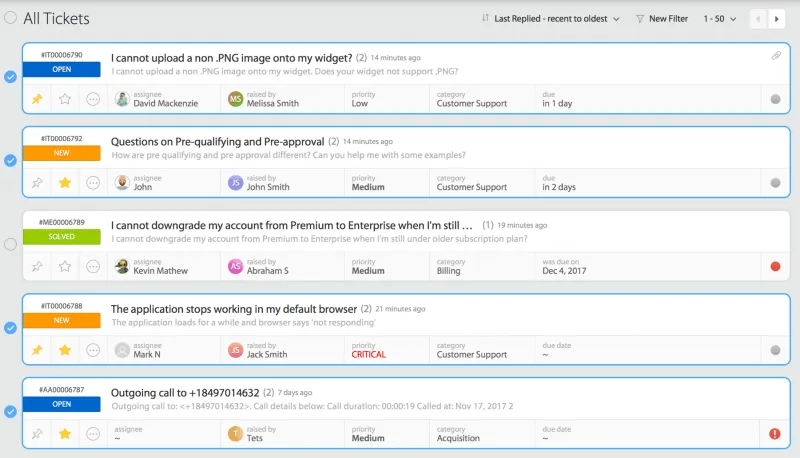
We can also build this handy feature into your new system: ticketing. What is it? When a client calls and only their consultant can deal with the request, but the consultant is at lunch or out of the office, a "ticket" is created, in other words a task. When creating the task you assign the people who will handle it and the clients, a priority (high, medium, low) and optionally a category (complaint, phone call, question, cancellation and so on).
As soon as the task is resolved, an employee closes it in the system. While the task is in progress, or if it is a more complex team task, all assigned employees can add comments. A notification of a new comment is also sent to the assigned employees by e-mail (or the author of the comment chooses who receives the e-mail notification).
Even trivial tasks can be handled this way ("Mr Novák called, call him back after your holiday") and you don't have to write the employee an e-mail. It is more efficient (the employee has to close the task, so you know it is done) and you have a perfect overview of your employees' work.
A final word
There really are many solutions we can provide. A new system can also be introduced gradually, for example if you don't want to invest a large sum at once. This approach has another advantage: employees get used to the new system step by step, it is not a big leap for them, and they can take an active part in its development and comment on its features.
At CKM 2000 Travel, for example (Matúš then still an employee of the company and Šimon an independent web developer), in the first year we implemented the client database, generation of PDF contracts and sign-up for visa interviews. The next year we improved the system based on employees' requests and added invoice generation with recording of payments. In the third year we added automatic calculation of the travel insurance price, generation of insurance, sign-up for events (interviews with employers), an online branch and more.
A gradual start has its advantages, but also its disadvantages. The disadvantage is that at the beginning people do not see and use all the benefits the system can bring, so the organisation introducing it does not use all the suitable features (and so does not save as much time, cost and, in the end, money).